

You can login to (using my preferences as an example) DDG and configure it to not use AI, but I mostly browse in private/incognito mode and don’t care to login to DDG every time I open a browser. However, I - and you - don’t have to login to enforce that preference; at least with DDG you can set a default search engine that automatically avoids it. Here are the parameters in mobile Firefox:

Even in Chrome and Chrome derivatives, you can set a default search engine; I don’t know the exact steps, but the end result should look similar to the above.
If you prefer to stick with Google, even they offer a no AI solution. I haven’t used Google in years, but according to arstechnica, this would be the equivalent configuration:
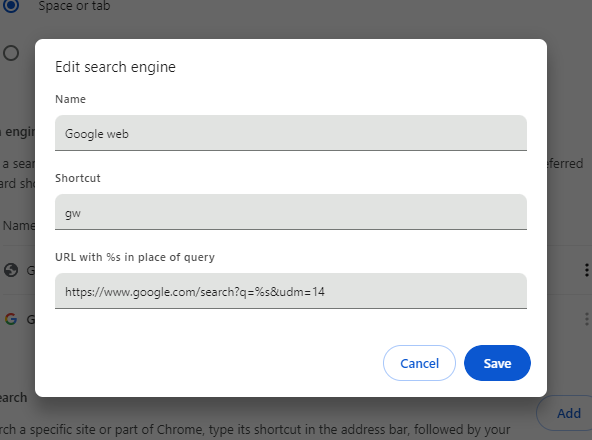
I’ve not used any other search engines since Altavista, so I can’t provide details for each one, but hopefully this is a good starting point.
edit: It seems this changed … Or maybe I had it wrong from the beginning, but I tested this when I posted it, so I think it changed. Regardless, the q= is not necessary currently.

https://youtube.com/watch?v=0-_hJthMgtM