
Lemdro.id

Our Mission 🚀

Lemdro.id strives to be a fully open source instance with incredible transparency. Visit our GitHub for the nuts and bolts that make this instance soar and our Matrix Space to chat with our team and access the read-only backroom admin chat.

Community Guidelines

We believe in maintaining a respectful and inclusive environment for all members. We encourage open discussion, but we do not tolerate spam, harassment, or disrespectful behaviour. Let’s keep it civil!

Get Involved

Are you an experienced moderator, interested in bringing your subreddit to the Fediverse, or a Lemmy app developer looking for a home community? We’d be happy to host you! Get in touch!

Quick Links

Lemdro.id Interfaces 🪟
Our Communities 🌐
Lemmy App List 📱
Chat and More 💬
Instance Updates

!lemdroid@lemdro.id

Create postCreate communityCreate multi-communityModlog

Hello all,

I have a Pixel 3a with Lineage OS.
I also have wired EarPods from Apple (3.5mm jack not the USB-C one) however it seems like the volume controls on there do not work (only play/pause). This is apparently nothing new as Apple and Google implemented inline controls differently.

I saw a couple of apps on fdroid improving AirPod support however I was not able to find the same for wired EarPods.
https://f-droid.org/packages/com.dosse.airpods/
https://play.google.com/store/apps/details?id=me.kavishdevar.librepods
https://f-droid.org/packages/eu.darken.capod/

Does anybody know if there is a way to fix EarPods on Android?


cross-posted from: https://piefed.social/c/android/p/2040603/does-aurora-store-automatically-install-google-services-microg

Hello all,
just got my Android Phone with LineageOS installed. (Pixel 3a (LineageOS 22))

Have a question now regarding Apps needing Google Services. When Installing LineageOS i have opted out of installing any Google Apps, at least I really do think so.

However, I just installed Aurora Store to install a banking app I need. I did not do anything else and only installed Aurora Store and the Banking App without microG or other replacement. It says under compatibility that it would work with limited features if Google Play Services are not installed so I thought I give it a try and see how far I get.

Surprisingly far as it turns out. Everything works except for notifications, but that was to be expected. But now I notice two updates in the Aurora Store:

  • Android System Intelligence
  • Private Compute Services
    Am I correct to assume that these are integral to the AOSP/LineageOS? or does Aurora Store install Google Services when missing? I kinda expected that those components would be updated through the normal LineageOS update flow and not through Aurora Store.

Hope somebody can clear those questions up.

PS: Android is so incredibly delightful btw. happy to have switched back.


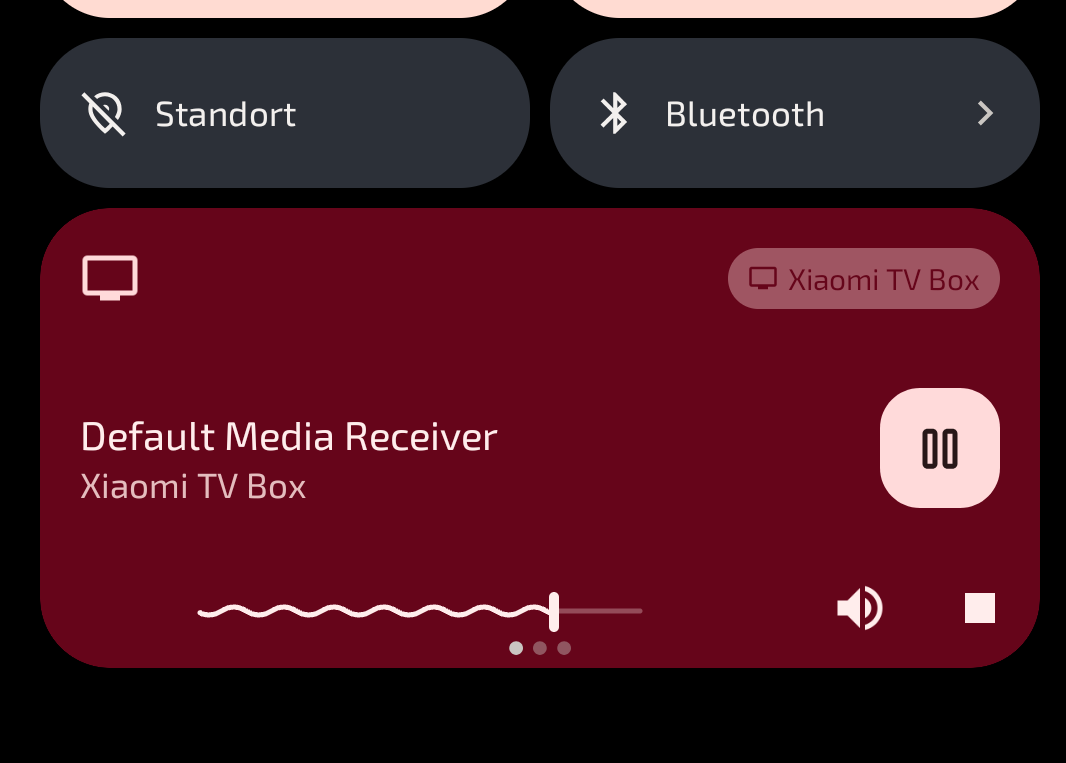
When I’m logged into my home wifi there’s frequently a media player window showing me being connected/playing media from a xiaomi tv box (possibly a roommate’s) that to my memory I never connected to. What is it doing there? Did the tv box possibly get hacked and is doing uncool stuff now? How do I disconnect from it/block it? I can’t really find anything useful in the settings.


Bit of back story, I started with Android (2010-2014) but have used iPhone since. I have an Android phone (Galaxy S10) I use for some things. My wife is an Android user since 2010 but is not very technical.

Right to my question: how do you manage your images/gallery on Android? I know that the Android OS defaults to sorting by folder. I used to use QuickPic; my current gallery of choice is Google Gallery, for its simplicity (and being free). So you have your camera pics, your saved images, images from various apps tend to be in folders for those apps.

Is that organisation good enough for you? Or do you do more?

Jumping over to the Apple side, every image, saved or taken with the camera, goes into the “Camera Roll” gallery. It’s all one monolithic thing. You can create albums within it, but unless you did that from the start, it’s a monolithic task. Fortunately I found an app that makes it easy. It shows me an image, I tap the album I want to put it in. After a few hours, I had it sorted. Now I have a wallpaper album, an album of pictures of my wife, an album for holidays, an album for friends, one for cars, one for food… and so on. Every week or so I go back to this app to get the unsorted ones.

Yesterday I was looking at my wife’s phone, and something bothered me. It occurred to me that, she’s had this phone for 3 years and has never changed the lock screen. She said she tried to do it once and couldn’t figure it out, so she left it alone. (It’s a Galaxy S22, if you’re curious.) I had a minute, so I dived in. Found it pretty quick. Asked her what she wanted. She said there was a wallpaper from this anime I sent her once… This is when I found an issue with Android’s image organisation. It was hard to navigate and completely unsorted. (Likely, partially user error, which is why I’m asking here!) I solved the problem by going to my iPhone, going into my wallpaper album, finding the wallpaper in question, sending it over to her, and then picking it as the most recent image. I got the clock set up with her favourite colour, and now she’s super happy with her lock screen. It’s no longer “just there,” now it reflects its owner better. Win/win. (Of course, if you looked at my S10, you’d never know it was managed by an “Apple guy.” Nova Prime, everything customised to specification… honestly still an awesome phone, and does a few things better than my five-years-newer 16 Pro Max.)

So, TL;DR: are you happy with the folder-based (source-based) gallery system in Android? If so, how do you make it work for you? How can a user with something like 2500 saved images best make it work for them?


When I’m using Android Auto, my phone will intermittently lose cell signal. It doesn’t happen all the time. Sometimes I’ll go weeks or months without it happening, then other times it will happen several times in a single trip.

There have been a couple times when the phone seemed to be acting up before it completely lost the signal. The only way to recover is to restart the phone.

It has never happened when not using Android Auto.

It happens in my current car, a 2022 Honda Ridgeline with wired android auto support. I recently bought a wireless adapter for the car, and it happens with that as well. It also happens when my phone is plugged into our 2020 Honda Civic.

It happened with my previous phones when I was using Android Auto in my 2011 Honda Ridgeline which only had an aftermarket Bluetooth adapter.

Current phone is a Samsung Galaxy S10. Previous phone was an LG Nexus 5x.

It seems that the only common issue is Android Auto.

Has anyone else experienced this?